NetSuite order entry without the rekeying.
Flowy turns a rep’s typed or dictated request into a checked order preview using the company’s own customer, item, pricing, discount, and order-history records.
Request early access during signup. Access is reviewed and enabled per organization.
From what the customer said to a reviewable order.
The assistant handles interpretation. Your configured records, pricing rules, permissions, and export setup remain authoritative.
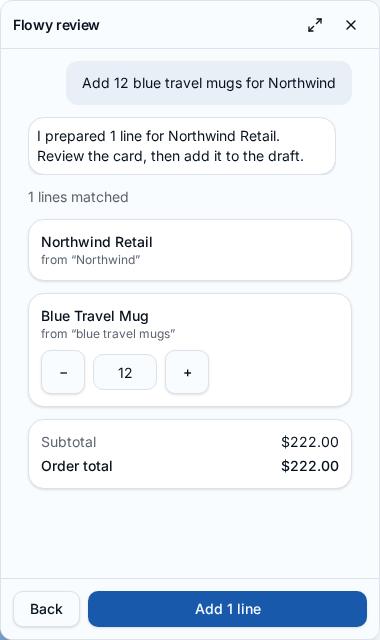
Three steps, with the rep in control.
1. Say or type the request
Enter a new order, ask for a reorder, change quantities, or apply a supported whole-order discount.
2. Match against live app records
Customers, items, current prices, visible order history, and permissions are checked before the preview appears.
3. Review and confirm
Resolve ambiguous matches, edit quantities, inspect totals and warnings, then add the result to the normal order draft.
Nothing saves itself
The matched records and calculated values appear in cards. A rep confirms before they enter the order draft.
AI explains; rules decide
AI helps interpret the request and phrase a short reply. Deterministic matching, pricing, permissions, and validation decide the result.
The export checks still apply
Orders continue through the existing review, commit, and NetSuite CSV preflight workflow.
Coming soon: purchase-order PDF, photo, and forwarded-email capture. These are not included in the current early-access offer.
Frequently asked questions
Does Flowy save orders automatically?
No. Flowy shows the matched customer, items, quantities, prices, discounts, totals, and warnings. The rep confirms before anything is added to the normal order draft.
Can a rep reorder a previous order?
Yes. A rep can start from visible order history, choose lines, and change quantities before confirming the new draft.
How are discounts handled for NetSuite?
Whole-order discounts follow the company’s configured export mode: a NetSuite discount item and rate, a configured subtotal-and-discount line, or net rates. If discount handling is not configured, the order is blocked for review.
What data can Flowy use?
Flowy can use customer, item, pricing, and order-history records the signed-in rep already has permission to view. Its result cards show the records and values used.
Is purchase-order document capture included?
Not yet. Purchase-order PDF, photo, and forwarded-email capture are coming soon and are not part of the current early-access offer.
How do I get access?
Choose the early-access option when creating an account, or request it from Billing after signup. NetOrderFlow reviews and enables access per organization.
Start with the real order workflow. Request Flowy when you sign up.
The 14-day trial starts without a credit card. Your early-access request is reviewed separately and does not enable the feature automatically.
Start free trial